Add funds to your wallet
Top up your FlowChord balance through Stripe's secure checkout, with extra balance on the larger amounts.
Updated October 22, 2026
Your balance pays for your videos. You add to it in fixed amounts — top-ups — on Stripe’s own secure page, and the money lands in your wallet as soon as the payment is confirmed. A top-up is never charged automatically: you top up only when you choose to. To see what a video costs, read How pricing works.
Before you start
- Check the currency. While your wallet’s currency isn’t fixed yet, a line at the foot of the dialog says which currency your prices are in and the country they come from, and Change lets you pick the country you pay from. Your first top-up fixes the currency.
- Your browser must be allowed to open a new tab: Stripe’s page opens in one.
Steps
- Press your balance in the top bar, or open the account menu and choose Add funds.
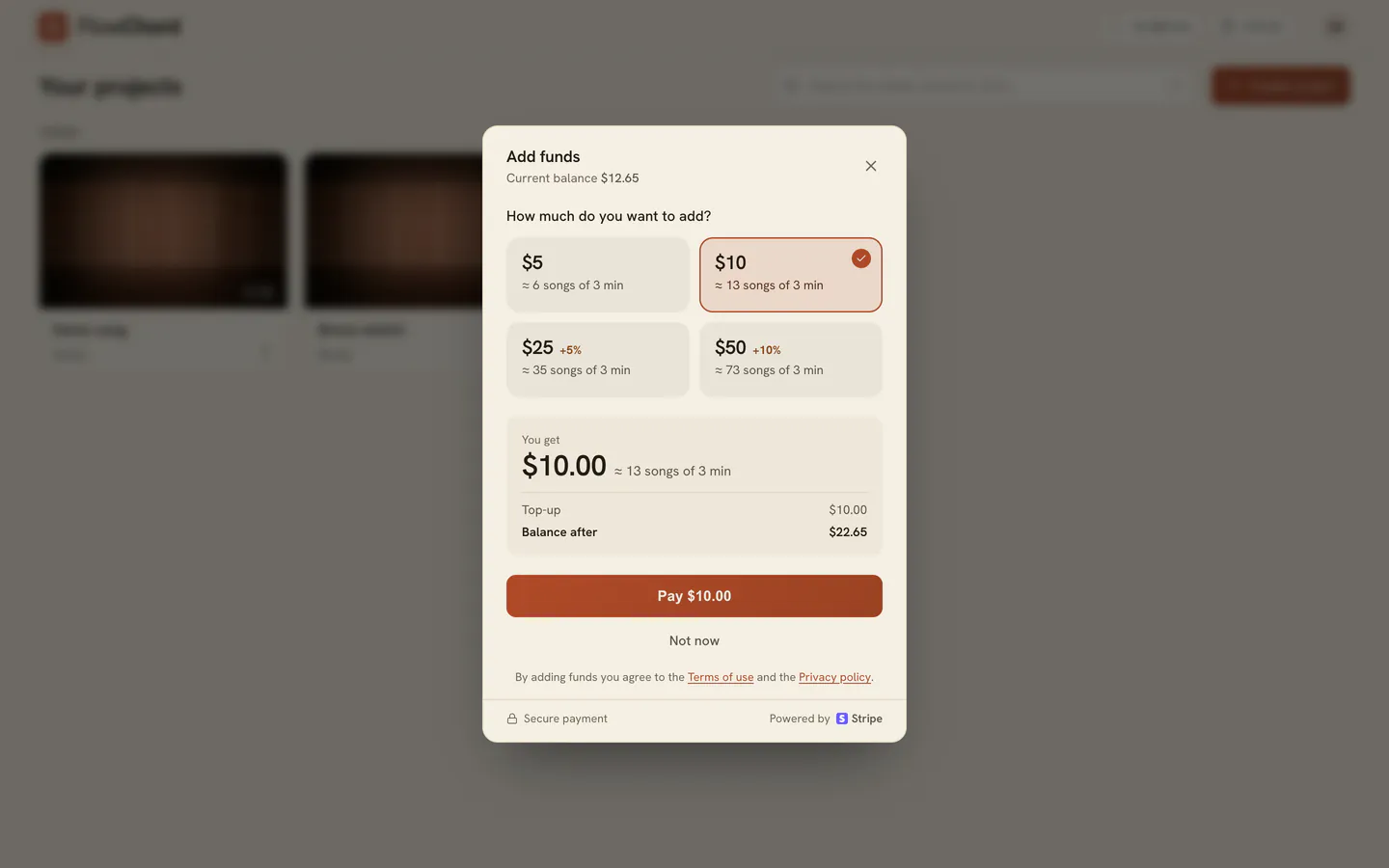
- Under How much do you want to add?, pick an amount. Each tile says about how many three-minute songs it pays for.
- Check You get: the top-up, any extra balance that comes with it, and your balance after it.
- Press the Pay button — it shows the amount. Stripe’s secure page opens in a new tab.
- Pay on Stripe’s page, with a card or another method Stripe offers where you are.
- Come back to FlowChord. The dialog closes by itself once the payment is confirmed, a message says what was added, and your new balance shows in the top bar.
Options
| Top-ups | Fixed amounts in your wallet’s currency, one tile each in the dialog |
| Extra balance on larger top-ups | Shown as a tag on the tile, and as its own line under You get |
| First top-up bonus | While the offer lasts, your first top-up gets an extra 20%, up to the amount the dialog shows |
| Promotion codes | Entered on Stripe’s page. A code that discounts the whole top-up still adds its full value to your balance |
Extra balance, the first top-up bonus and any balance FlowChord gives you are promotional: they are never refunded.
Tips
- Opened from a song you are creating, the dialog says what the song costs and what is missing, and picks the smallest top-up that covers it.
- On a monthly plan, your plan’s minutes are used first; your balance pays for the minutes past them.
- Your card and payment details go only to Stripe; FlowChord never sees them.
- For a wallet in reais, Stripe may offer Pix. A Pix payment is confirmed by your bank: the dialog says the payment is on its way, and your balance updates by itself once the bank confirms.
- Every top-up appears in Balance history, with any extra balance it brought.
Common problems
- The new tab didn’t open. Your browser blocked it. Press Open payment in the dialog.
- You closed Stripe’s tab by mistake. Press Open again in the dialog.
- The dialog keeps waiting after you paid. It checks again by itself when you come back to its tab; once it stops waiting, or says the payment is on its way, press Check again. If you were charged, the funds show up in FlowChord in a moment.
- You cancelled on Stripe’s page. Nothing was charged; the dialog goes back to the top-ups. If no FlowChord tab was waiting, the library says Payment canceled · nothing was charged.
- The page after paying says We couldn't confirm the payment yet. If you were charged, the funds show up in a moment. Press Back to FlowChord, and see Payment problems if they don’t.
- The prices are in the wrong currency. Press Change and pick the country you pay from — possible only until your first top-up or paid video. After that, write to us through Support.
- The top bar says Balance unavailable. FlowChord couldn’t read your balance. Press it to read it again.
Was this article helpful?
Still stuck?
Write to us and a person on the FlowChord team will answer by email.
Contact us