See your purchases, receipts and refunds
Balance history lists every top-up, every video your balance paid for and every refund, with your balance after each.
Updated October 22, 2026
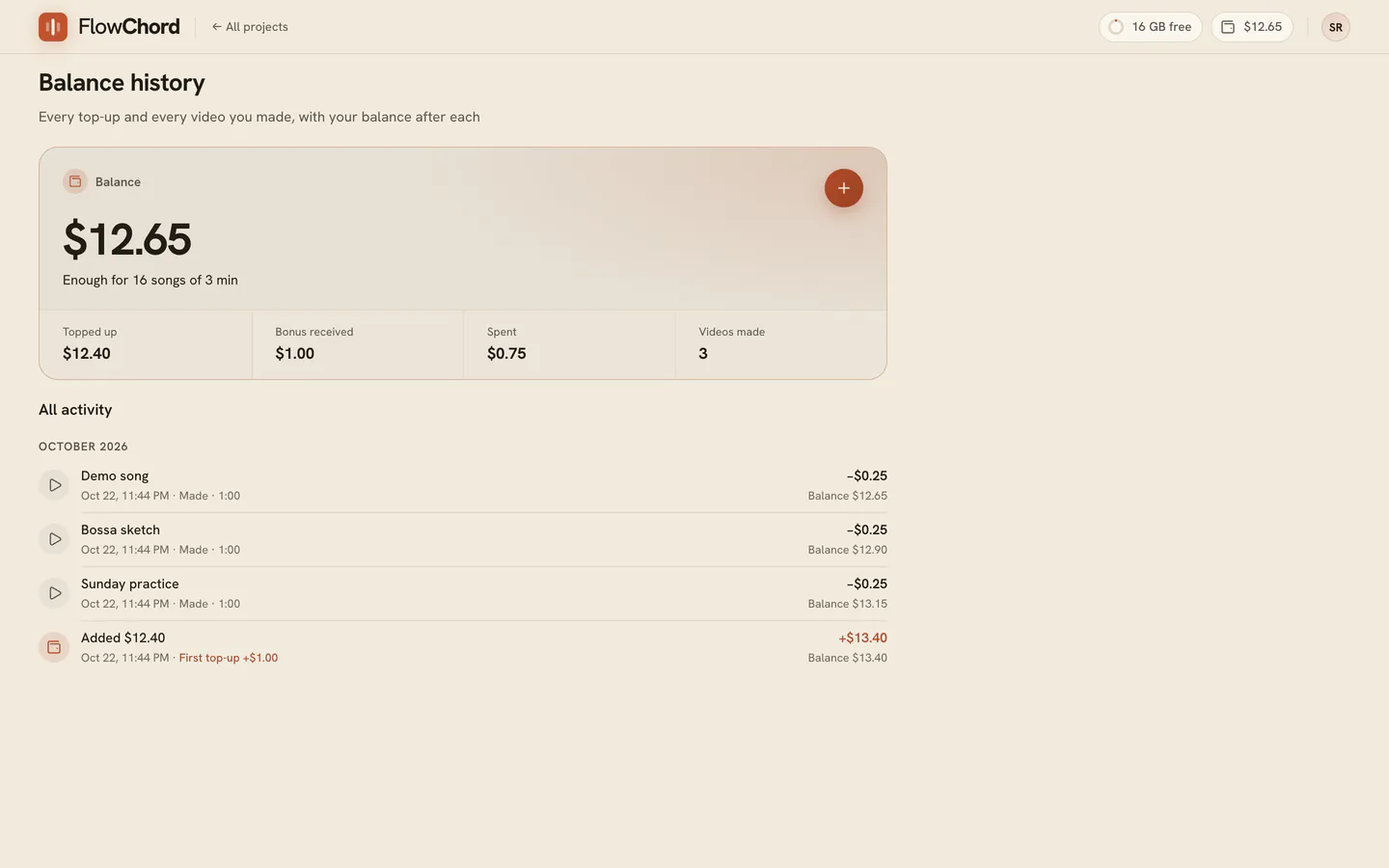
Balance history is the record of your wallet: every top-up, every video your balance paid for, every refund and every gift, newest first, with your balance after each line. It is where to look when a number doesn’t seem right. For what things cost, see How pricing works.
Steps
- Open the account menu and choose Balance history.
- Read the card at the top: your Balance, about how many three-minute songs it pays for, and the totals: Topped up, Bonus received, Spent and Videos made. The plus button on it opens Add funds.
- Scroll through All activity, grouped by month. Each line says when it happened, what it moved, and your balance after it.
- Press a project’s name on a line to open that project.
Options
What each line means
| Line | What it means |
|---|---|
| Added, with an amount | A top-up. The amount on the right includes any extra balance it brought; below it, the bonus, the first top-up bonus, what Stripe charged when it differs (another currency, a discount), a promotion code, and anything refunded |
| A project’s name | A video your balance paid for, with why: Made, Finished (Play Along), Unlocked, Longer audio or Re-analysis, and the song’s length |
| Free | Your free video: nothing was taken |
| Gift | A video FlowChord gave you: nothing was taken |
| Refund | Money given back, with why: Analysis failed, Creation failed or Upload failed |
| Gift from FlowChord | Balance FlowChord gave you, with its end date when it has one |
| Gift expired | What was left of a gift at its end date, removed |
| Top-up refunded | A top-up refunded to you |
| Payment disputed | A payment your bank took back after a dispute |
| By hand | A correction made by FlowChord, with its note |
| Deleted project | A video whose project you have since deleted |
Receipts and plan payments
FlowChord doesn’t make receipts of its own: Balance history is the record of every payment to your wallet. If you need a receipt for a payment, write to us through Support.
Your monthly plan’s payments aren’t in Balance history: Stripe charges them each month, and FlowChord e-mails you when the plan renews. Videos paid with your plan’s minutes aren’t listed either; the Plan page shows the minutes you have used this month. Only minutes past the plan’s, paid from your balance, appear here.
Refunds
- A failed analysis — a provider error, or work that never completes — gives back what it cost, automatically.
- A project that fails before its files are stored gives back everything it took, automatically. Your free video comes back too.
- Unused balance: you can ask for a refund of the unused paid balance of a top-up within a week of buying it. Write to us through Support, or to [email protected], from the e-mail address on your account. The extra balance that came with that top-up is removed with it, and the refund goes through Stripe to the payment method and currency you paid with.
- Extra balance, the first top-up bonus and gifts are never refunded.
The Terms of use (section 3.5) give the full rules, and any right your country’s law gives you still applies.
Common problems
- You paid but no top-up shows. A Pix payment can take a moment to be confirmed by your bank. See Payment problems.
- A video cost more than its length. Look for a Longer audio line: the audio FlowChord measured was longer than the length read when you created the project.
- The amount Stripe charged is in another currency. Stripe may show the price in your own currency. Your wallet is always credited in its own currency, at the top-up’s value; the line shows what was charged.
- The page says Couldn't read your purchases. Press Retry.
Was this article helpful?
Still stuck?
Write to us and a person on the FlowChord team will answer by email.
Contact us