Check that your browser works with FlowChord
See what your browser can do on the device check page, and what to do when something you need isn't supported.
Updated October 22, 2026
FlowChord has no app to install: it works in your browser. It makes your files smaller before they upload, plays your project in the editor and builds the exported video right on your own device. That needs a recent browser that can read and write video by itself. Most up-to-date browsers on a computer can; on a phone, it depends on the system version.
FlowChord has a page that asks your browser exactly what it can do, so you never have to guess.
Before you start
- Open the page in the same browser, on the same device, you want to use FlowChord on. Each browser gives its own answer.
- You don’t need to be signed in.
- Update your browser and, on a phone, your system first. Many problems go away with an update.
Steps
- Go to app.flowchord.studio/device-check.
- Wait a moment while the page reads your browser.
- Read the list under What it allows: each row says whether this browser can do one part of making a video.
- To see the details, look under What the browser said.
- If you are writing to support about a problem, press Copy report and paste the report into your message.
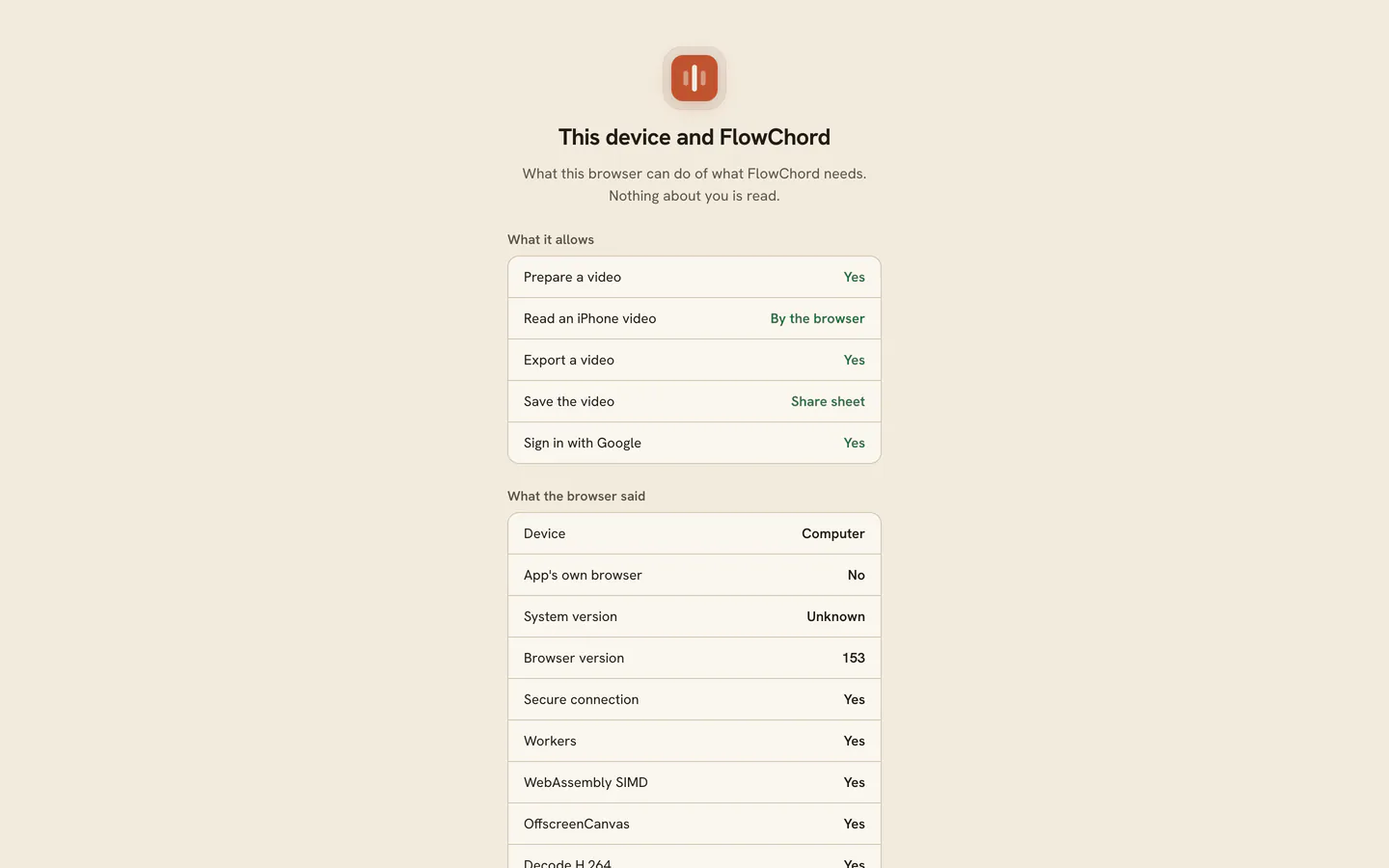
The page reads only what the browser can do. Nothing about you is read or saved.
Options
What each row under What it allows means:
| Row | What it means | If it says no |
|---|---|---|
| Prepare a video | The browser can make your video smaller before it uploads | A large video may be refused. Update the browser or try another one |
| Read an iPhone video | The browser can show the picture of a video recorded on an iPhone, by itself or with FlowChord’s own decoder | An iPhone video would play as sound only. See A file won’t upload or play |
| Export a video | The browser can build the finished video file | You can edit, but not export. Export from a computer or an updated browser |
| Save the video | How the finished video reaches you: the phone’s share sheet or a download | Nothing to fix: FlowChord uses the way your browser has |
| Sign in with Google | You can sign in with Google here | You are probably in an app’s own browser. Open FlowChord in your phone’s browser, or sign in another way |
The details list includes Secure connection. FlowChord always runs over a secure connection (an address that starts with https). If that row says no, check the address you opened.
Tips
- Keep your browser up to date. FlowChord asks the browser what it can do each time, so an update can turn a “no” into a “yes” right away.
- A computer is the most comfortable place for long songs. Some things are on the computer only for now: Play Along, several videos or audio files in one project, and a chord sheet when you create a project.
- On a phone, use the phone’s own browser rather than the browser inside Instagram, Facebook or TikTok. See FlowChord on your phone.
Common problems
The phone says it can’t make videos yet
When you start a new video on a phone whose browser can’t prepare or export a video, FlowChord shows This phone can't make videos yet and tells you what to update. Update the phone’s system and its browser, then open FlowChord again in the phone’s own browser. Until then, you can make your video on a computer.
You opened FlowChord from a link in Instagram, Facebook or TikTok
Those apps open links in their own browser, which can’t sign you in with Google or save your video to the phone. FlowChord offers to open the page in your phone’s browser. If nothing opens, press Copy link and paste the link into your browser, or use the app’s own menu to open the page in the browser. You can also press Stay here and sign in with your e-mail instead of Google.
The Export window says export isn’t supported
The Export window warns that video export isn’t supported when this browser can’t build a video file. Update the browser, or export from another browser or a computer. Your project is saved, so you can open it anywhere you sign in.
The video plays as sound only
The browser can’t show this video’s picture. Under the preview, FlowChord says “This browser can't show this video's picture, so here it plays as sound only. Convert it to H.264 (MP4) or try another browser”. See A file won’t upload or play for what to do.
Play Along can’t record
Recording needs a browser that can use the microphone and the camera. When it can’t, the Play Along choice says this browser can’t record. Use an up-to-date browser on a computer; the device check page shows what yours can do.
Was this article helpful?
Still stuck?
Write to us and a person on the FlowChord team will answer by email.
Contact us