Download a copy of your data
Save one file with your account, projects, chords, lyrics and purchases, plus links to every file you stored.
Updated October 22, 2026
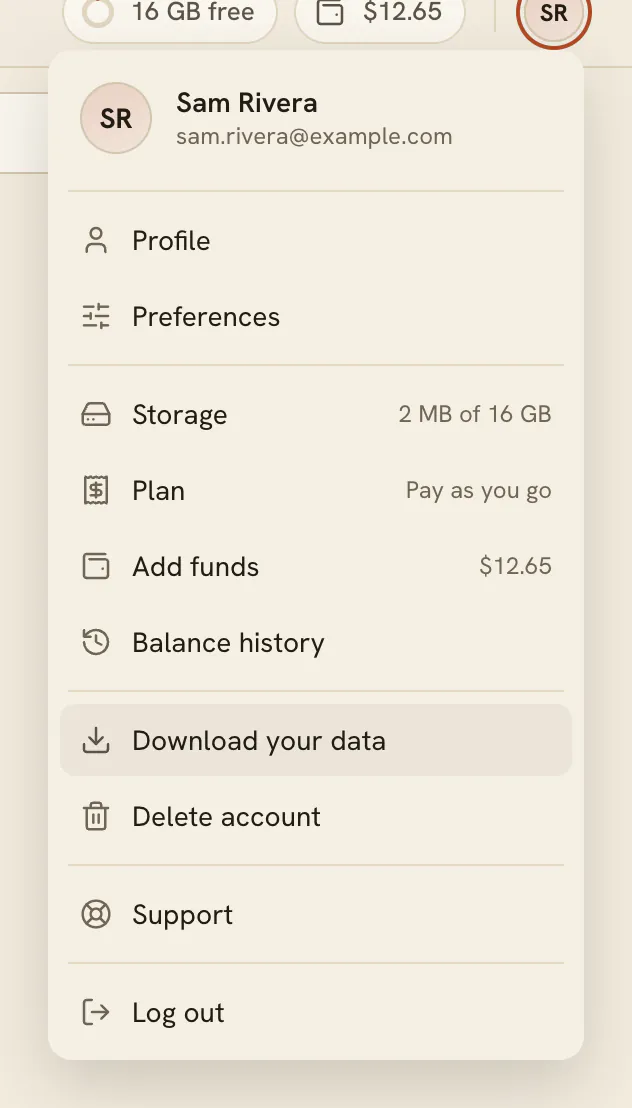
You can save a copy of what FlowChord keeps about you at any time, from the account menu. It is one file with your account, your profile and every project with what is in it, plus a link to download each file you stored.
Before you start
- The copy is a JSON file: plain text you can open in any text editor. Your videos and pictures aren’t inside it — it holds a link to each of them.
- The stored files are the copies your browser prepared before uploading them, not your original files.
Steps
- Open the account menu.
- Choose Download your data. A message says Preparing your data…
- Wait while FlowChord gathers everything. Your browser then saves a file named flowchord-data followed by today’s date.
- A message says Your data was downloaded. Its links to your files last a week
- To get a stored file, open the copy, find the file’s link, and open it in your browser.
Options
| Part of the copy | What it holds |
|---|---|
| Account | Your account’s id, its e-mail address and when it was created |
| Profile | Your profile and your preferences |
| Projects | Each project with its settings, its video, its cover picture and its files, its cuts, its chords and its lyrics |
| Files | A link to every file each project’s folder holds, even ones no setting names |
| Fingerings | The chord shapes you saved |
| Terms | Each version of the Terms you accepted, and when |
| Wallet | Every line of your balance history |
| Plan | The record of your monthly plan |
Tips
- The links to your files work for about a week, as the message says. Download the files you want soon; a new copy gives you new links.
- Videos you exported are on your own devices, not in FlowChord: keep them.
- Thinking of deleting your account? Download a copy first — see Delete your account.
Common problems
- The message says Couldn't prepare your data. Try again FlowChord gives you the whole copy or none: if any part can’t be read, no file is saved. Try again in a moment; if it keeps failing, write to us through Support.
- Nothing was saved. Your browser may be blocking downloads from the app. Allow them and try again.
- A file’s link doesn’t open. It is older than the links last: download a new copy. A project whose footage was removed — a free video past its days, or an archived video — has no video file left to link to.
Was this article helpful?
Still stuck?
Write to us and a person on the FlowChord team will answer by email.
Contact us